
How Syville Consulting deployed an AI‑driven email engine that personalizes and scales without adding headcount
Executive summary
In just three days, Syville Consulting built a working Proof of Concept that fully automates the outreach workflow—from identifying and contacting professionals, to collecting enriched data from LinkedIn and the web, to sending hyper-personalized cold or warm emails.
By integrating tools like Zapier, OpenAI, LinkedIn data extraction, and a lightweight data store, we created a seamless, AI-powered pipeline that mimics the precision of 1:1 manual research—at scale.
This use case proves that AI automation doesn’t need to be complex to be powerful. With the right setup, you can go from idea to impact in under a week—without needing a team of engineers or data scientists.
Continue reading below the video.
The Business Challenge
In today’s competitive landscape, personalized outreach isn’t a nice-to-have—it’s the baseline expectation. Yet for most sales and marketing teams, personalization at scale is incredibly difficult to achieve.
- Generic emails get ignored. Prospects are bombarded with templated messages that feel robotic and irrelevant.
- Manual research is time-consuming. Gathering meaningful context—company role, recent activity, content published—takes valuable hours per prospect.
- Missed opportunities. Without relevance, even well-timed outreach fails to convert or spark interest.
- Scaling outreach dilutes quality. As volumes increase, the personal touch gets lost—and so does engagement.
The result? A broken outreach process that either doesn’t scale or doesn’t resonate.
The Solution
The system begins by identifying a target professional—either from an inbound interaction or through outbound prospecting. Once identified, the workflow triggers a data enrichment pipeline that pulls publicly available information from sources like LinkedIn and other relevant web content. This includes the person’s role, company, seniority, industry, and any contextual signals that can enhance the message relevance.
This information is then stored in a lightweight, structured data store, which serves as the foundation for hyper-personalized email generation. Using OpenAI and custom prompt templates, the system crafts tailored outreach emails that reflect the professional’s unique context—referencing their work, recent posts, or shared interests. The message feels handcrafted and personal, but is produced at scale.
A human-in-the-loop reviews the email draft before sending, ensuring tone, intent, and facts are on point. Once approved, the email is sent automatically—making the entire workflow fast, personalized, and high-converting, without the manual effort traditionally required.

The 3 atomic automated processes
It’s clear that some setup and technology choices were selected as this was part of a POC (proof of concept): e.g. Google Sheets & Google Drive usage should be reconsidered for more scalable solution when putting this in production .
The Technology Blueprint
| Layer | Tool | Purpose |
|---|---|---|
| Orchestration | Zapier | Automates the end-to-end workflow—from lead capture to email delivery. |
| Data Enrichment | LinkedIn + Web Scraping | Gathers publicly available professional data to personalize outreach. |
| Language Model | OpenAI GPT-4.1 | Generates hyper-personalized emails using dynamic prompt engineering. |
| Admin Console & Data Store | Google Sheets (PoC) → Airtable (prod) | Stores enriched profiles and message drafts for easy access and tracking. |
| Collaboration | Slack | Notifies the team when drafts are ready for review or approval. |
Phase 2 will include a dedicated knowledge base, automated reply tracking, and performance analytics integration.

The Admin Console in Google Sheets
0. Preparation: The Foundation of a Scalable Personalization Engine
Before automation or AI magic can happen, there’s one essential step that often gets overlooked: preparation. In this phase, we design the workflows and ensure the AI truly understands the business it’s supporting. Without this foundation, even the most powerful automation risks becoming chaotic at scale.
If you’ve read our first use case, you’ll notice that many of the foundational steps outlined here are exactly the same. That’s by design. Once the groundwork is done for one use case, it becomes a reusable asset—easily extended to support new workflows. The data, infrastructure, and automation logic can be continuously leveraged, making each additional use case faster and more efficient to implement.
0.1 Designing the Workflows
Every successful system starts with a solid blueprint. We defined three independent, atomic workflows, each responsible for a clear, focused outcome:
Workflow DM004 – Automated Data Collection
Triggered when a new lead is entered. This workflow scans LinkedIn and the web to collect structured, reliable professional data about the contact.Workflow DM005 – Automated Draft Email
Triggered by a human reviewer. Based on the enriched profile, a hyper-personalized email is automatically drafted using contextual information.Workflow DM006 – Automated Email Sent
Once the draft is approved, the human reviewer triggers the final step: sending the email.
Each workflow is carefully mapped out to ensure clarity on triggers, transitions, and review checkpoints—keeping the system both robust and scalable.
0.2 Content Preparation: Capturing the Business Essence
As always, great personalization starts with deep understanding. To generate content that’s not only grammatically correct but also strategically aligned and on-brand, the AI needs context.
For this proof-of-concept, I used my own company—Syville Designs—as the test case. (Side note: if you’re looking for a premium personalized gift that creates lasting memories, do check it out!)
I had already documented the business in a 60-page strategic overview. For AI use, I broke it down into digestible, structured parts:
- Market and Product Positioning (thanks, April Dunford 😉)
- Company and Product Overview
- Competitive Analysis
- Branding and Messaging
- Marketing Execution Tactics
- Ideal Customer Profiles (ICPs)
- Market Trends
- Unique Capabilities and Values
- Marketing Categories & Strategy
- …
0.3 Setup: Teaching the AI What Matters
To generate intelligent, context-aware content, the AI needs access to the right inputs. That’s why I created a custom OpenAI Assistant—called Betty—and equipped her with domain-specific knowledge.
Here’s what that setup involved:
- Creating a dedicated project and Assistant on OpenAI
- Uploading all key documentation into a vector store (a semantic search database)
- Enabling File Search, turning Betty into a Retrieval-Augmented Generation (RAG) assistant capable of referencing company-specific knowledge on demand
Want to set this up yourself? Check out my separate blog post: “How to Build a Mini-RAG with OpenAI Assistants and File Search.”
This setup allows us to plug Betty into any content or outreach pipeline, with full awareness of the brand’s tone, positioning, and messaging framework.
0.4 Prompt Engineering: Guiding the Output
Every AI interaction is driven by two things:
- An action statement: What should the assistant do? How should it use the known data to personalize the email?
- Style & Structure & Policy: How should the output be structure, sound and respect/not do?
This is the secret to transforming a general-purpose model into a brand-aligned content generator—one that speaks with your voice, understands your audience, and delivers consistently high-quality output.

DM004 - Automated Data Collection
1. Automated Data Collection
This workflow is triggered automatically when a new lead is added via a Google Sheets-based form. It kicks off a fully automated enrichment pipeline: LinkedIn data and reliable internet data, such as Company, role, location, … is collected, saved to Google Drive. The enriched data is then formatted and written back into the customer database in Google Sheets.
Finally, a Slack notification alerts the team that a newly enriched lead is ready for review—closing the loop with full visibility and zero manual effort.
Potential future enhancements:
- Use the scraped company data enrich: futher personalize the email with company information
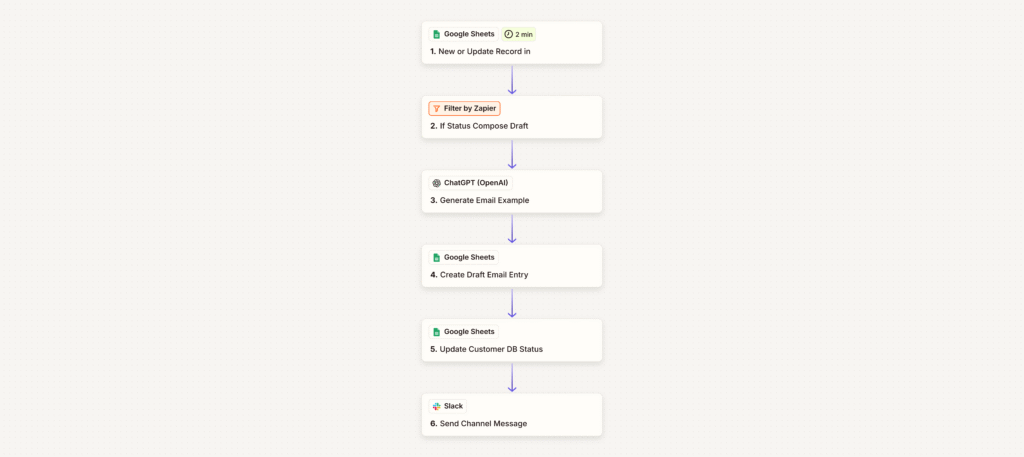
2. Automated Draft Email
This workflow is initiated when a human reviewer updates a lead’s status to signal that a personalized email draft should be generated. A filter ensures the workflow proceeds only if the status is set correctly.
OpenAI’s ChatGPT then generates a hyper-personalized email draft using the
- enriched profile data previously collected
- the product of interest
- the company’s product information and branding.
The draft is saved back into Google Sheets, the lead’s status is updated to reflect the draft stage, and a Slack message is sent to notify the team that the email is ready for review. The process ensures high-quality personalization with minimal manual input while keeping the team in the loop at every step.
3. Automated Email Sent
Once the email draft is approved and marked as ready in the Google Sheet, this workflow takes over. A filter confirms the contact’s status and verifies the draft is complete. Then, the finalized email is sent directly to the recipient.
A record of the email is saved to Google Sheets for tracking and audit purposes, and a Slack notification is dispatched to alert the team that the email has been successfully sent. This final step ensures visibility and traceability while maintaining the smooth, hands-free execution of the outreach process.
Potential future enhancements:
- a performance tracking feature that will automatically monitor engagement metrics—clicks, impressions, reactions—and use that data to highlight what’s working best. This feedback loop will help refine future content and continuously improve results.
- a scheduling mechanism: investigate what the ideal times and days are to publish content and allow the marketer to schedule the content publication
Governance: The Human‑in‑the‑Loop Principle
AI accelerates production, but final editorial control remains with your subject‑matter experts. This safeguard prevents off‑brand messaging and factual errors while keeping turnaround times measured in hours, not days.
How Syville Consulting Can Help
- Your partner in AI Automation: You think this is what you need, but not sure how to start … No worries, we are here to help and guide you.
- POC (value) in one week — We deliver a customised, fully documented workflow adapted to your tech stack.
- Scalable solutions fit for your business — Engagement data feeds back into the prompt library for ongoing improvement.
To discuss how an AI‑driven content engine could support your growth objectives, request a 30‑minute consultation. We will outline a pilot tailored to your channels, audience and KPIs. Other wise feel free to Contact us
Syville Consulting • April 23 2025 • Brussels, Belgium
DM005 - Automated Draft Email

DM006 - Automated Sent Email