
Large Language Models (LLMs) are powerful tools for processing and generating human-like text. The answers that they provide are based upon their world knowledge; the huge data set that were trained on that is encoded in their parameters.
However when you have content that is recent or not public knowledge, how do you tailor their knowledge to your specific needs? Users often seek ways to enrich these models with additional content.
This document explores three primary methods for enhancing an LLM’s knowledge:
- Retraining
- Retrieval-Augmented Generation (RAG), and
- Document uploads via the context window.
Each approach has its strengths and use cases, which we will examine in detail.

1. Retraining a Model
Retraining, or fine-tuning an existing model, involves directly modifying the model’s internal knowledge. This method is like sending a student back to school with new textbooks and study sessions.
Key Characteristics:
- Permanent Knowledge Updates: The model internalizes new information permanently. It becomes part of the world knowledge of the model. Stopping and starting a session will not lose your knowledge.
- Computationally Expensive: It requires ‘retraining’ the model and this requires significant computing power, time, and expertise.
- Because of this reason it’s not well suited for content that is frequently updated and renewed
- Not Always Feasible:
- Many proprietary models (e.g., ChatGPT) do not allow direct retraining. Opensource models like e.g. LLama can be
- Requires a lot of quality data for the subject matter.
Example:
Fine-tuning an open-source model like LLAMA 3.2 requires access to model weights, specialized hardware, and software like PyTorch or TensorFlow.
Why It’s Not Always Practical:
- Licensing and access restrictions on proprietary models.
- Required hardware is not available or high costs associated with hardware and computational resources.
- Not enough quality training data.
- You need to have advanced skills to do this complex implementation requiring programming knowledge.
- Not suited for frequent updated or high velocity content.
Due to these challenges, retraining is not the go-to method for most users, leading to the adoption of alternative approaches.
2. Retrieval-Augmented Generation (RAG)
RAG enhances a model’s responses by dynamically retrieving relevant external documents at query time. Instead of storing all knowledge internally in the model, the model acts as a librarian, fetching information when needed.
A typical RAG setup works like this
- All your specific information is stored in a ‘local’ database (typically a vectordatabase), which is maintained and updated as new or updated content is available
- Before querying the model with your prompt, your prompt is send to the vectordatabase to retrieve the most relevant section (chunk) of all the provided information.
- That information is sent along with your prompt to the LLM model as relevant information for your question.
- The LLM processes your request and augment his world knowledge with the provided database information to formulate an answer.
You can compare RAG as a student with his/her (world)knowledge that uses a specific page from a relevant book out of the library to solve a question.
Key Characteristics:
- Efficient and Scalable: Works well with large and evolving datasets.
- Real-time Information Retrieval: Ensures responses are based on the most recent data.
- Does Not Alter the Model’s Core Knowledge: Reduces the risk of forgetting prior learning.
- The amount of knowledge that you can provide is limited by the context windows, especially with local, older models where the context is sometimes very limited.
- The knowledge is persistent across sessions: you don’t have to enter the information manually for each session. If the information is available in the knowledge base, it can be used automatically.
Note: RAG is also possible with local ollama implementations.
Example:
A company implementing RAG could store legal documents in a searchable database. When a user asks about specific regulations, the system retrieves the most relevant clauses and integrates them into the model’s response.
Why RAG Is Effective:
- Allows models to stay up-to-date without retraining.
- Handles vast datasets without overloading memory.
- Reduces manual effort in updating model knowledge.
3. Uploading Documents to the Context Window
This method involves providing temporary context by uploading files during a session. The model can reference the documents but does not retain them beyond the current interaction.
This basically means that you upload the documents containing the answer at the moment of prompting or requesting the LLM for an answer directly from the user interface of along with the API.
Key Characteristics:
- Quick and Simple: No need for complex coding or infrastructure.
- Session-Based Knowledge: The model forgets the document once the session ends.
- Best for One-Time Queries: Useful for tasks requiring reference to specific documents.
Example:
Uploading a user manual to ChatGPT allows it to provide technical support during the conversation. However, the document must be re-uploaded in future sessions.
Limitations:
- Context windows have size constraints (e.g., 4,000 tokens for some models) so the amount of all information is passed on in the prompt
- Not suitable for ongoing knowledge retention; when you close your chat session, your uploaded knowledge document is lost
- Becomes inefficient for handling multiple documents frequently
4. ChatGPT Specials
ChatGPT offers 2 custom implementation of uploading documents to the Context Window:
- Custom GPTs
- Projects
Both allow users to extend and personalize ChatGPT’s capabilities, but they serve different purposes and offer distinct functionalities.
4.1. Custom GPT
A Custom GPT is a specialized version of ChatGPT that is ‘fine-tuned’ with user-provided instructions, personality, and optionally, uploaded documents. It enables users to create a version of ChatGPT tailored to specific needs.
Key Features:
- Custom Instructions – Define behavior, response style, or specific knowledge areas.
- Document Uploads – Enhance responses by embedding reference materials.
- No Code Required – Can be set up via a simple interface.
- Public or Private Sharing – Share with others via a link or keep it for personal use.
- Persistent Knowledge – Information persists across interactions.
Example Use Cases:
- A Legal Assistant GPT preloaded with company policies and legal documents.
- A Customer Support GPT trained on an FAQ document for handling inquiries.
4.2. Projects in ChatGPT
A Project in ChatGPT refers to a workspace where users can upload, organize, and interact with multiple documents in a structured manner. It provides a centralized environment to work on tasks that require reference materials. Projects keep chats, files, and custom instructions in one place. Use them for ongoing work, or just to keep things tidy.
This is one of my favorites: I have projects (sometimes I’m working on the fixing issues on my PC, sometimes I work on the business case for a new business, … ). Each of these projects have a specific history and context. Projects allows you to upload e.g. your personal resume and some information about, which becomes available when you are using that workspace.
Key Features:
- Multiple Document Handling – Supports various file formats.
- Session-Based Context – Documents are remembered during the session but do not persist.
- Collaborative Workflows – Allows structured problem-solving and information retrieval.
- No Model Customization – Unlike Custom GPTs, it does not alter the model’s core behavior.
Example Use Cases:
- A research project with multiple PDFs for legal, medical, or technical analysis.
- A writing project where different reference materials are uploaded for assistance.
- A data review project where reports, spreadsheets, and notes are analyzed together.
5. Implementation and Practical Applications
Using Context Windows in ChatGPT
- Click the ‘+’ icon below the chat input to attach a document.
- Upload the file.
- Ask the model specific questions about the document.
Creating a Custom GPT with Embedded Documents
- Navigate to “Explore GPTs” in ChatGPT.
- Select “Create” and define a purpose for the custom model.
- Upload relevant files to serve as the model’s knowledge base.
- Save and access the custom GPT anytime.
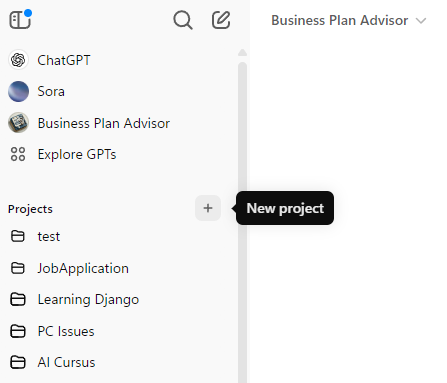
Creating a ChatGPT Projects
- Open the menu bar to the left of ChatGPT
- Click ‘+’ next to the Project menu item
- Provide a Project name
- Add files and instructions as desired.
Implementing RAG Locally Using OpenWebUI and Olama
- Install OpenWebUI locally or in a Docker container.
- Navigate to the admin settings and upload documents to a designated folder (open-webui/backend/data/docs (if running in a docker, you have to use the dockercopy command to copy the documents into the container’s folder
- Configure the system to scan and index documents for retrieval.
- Query the model, which dynamically retrieves relevant documents.
6. Choosing the Right Method
Method | Best For | Drawbacks |
Retraining | Permanent updates to model knowledge | Expensive, time-consuming, requires programming expertise |
RAG | Dynamic retrieval of large or evolving datasets | Requires external document storage and indexing |
Context Window | Quick reference to specific documents | Temporary, requires re-uploading documents |
Key Considerations:
- If you need permanent knowledge updates, retraining is the best but most resource-intensive option.
- If you need dynamic, scalable access to changing data, RAG is the optimal approach.
- If you need a quick, session-based solution, uploading documents to the context window is the easiest method
7. Conclusion
Enhancing an LLM with additional content can be done through retraining, RAG, or document uploads. While retraining offers long-term updates, it is costly and complex. RAG provides a scalable and efficient way to retrieve up-to-date information, while document uploads offer a quick but temporary solution.
Understanding these approaches helps users select the best method for their specific needs, whether for research, business, or customer support applications. With advancements in AI, leveraging these techniques effectively will ensure models remain relevant and insightful in various domains.
References:
Feed Your OWN Documents to a Local Large Language Model! by Dave’s Garage